40% of Enterprise Apps Now Use Task-Specific AI Agents: Is Your Mobile Architecture Ready?
Mobile users spent over 5.3 trillion hours inside apps last year, and phones now account for more than 60% of all internet traffic. At the same time, AI app downloads have exploded into the billions. People don’t just want to search for information on their phones anymore, they expect apps to complete tasks for them automatically. This growing demand is driving the rise of task-specific AI agents in mobile apps, enabling everything from document scanning to real-time navigation and workflow automation.
Yet, most company apps are failing to deliver.
Slapping a simple chat pop-up onto your mobile app isn’t an AI strategy, it’s a recipe for slow performance.
For years, businesses were told that adding a basic AI chat box was enough to be “AI-first.” That approach no longer works. Simply adding a chat window over an old app setup, a practice experts call “agentwashing”, causes apps to lag, drains phone batteries, and frustrates users.
The hard truth? Most current mobile apps were built to fetch static pages, not perform automated actions.
TL;DR – Key Takeaways
Too busy to read the full guide? Here’s what you need to know:
- By 2026, 40% of enterprise applications will use task-specific AI agents, up from less than 5% in 2025.
- Task-specific AI agents go beyond chat by completing multi-step tasks using device features like the camera, GPS, and NPU.
- slow performance, battery drain, and poor user experience.
- AI-ready mobile apps require edge-cloud processing,secure device integration, resilient workflows, and human approvals for sensitive actions.
- Businesses that modernize their mobile architecture now will be better prepared to deploy secure, scalable, and high-performing AI agents.
Table of Contents
- What Studies are Saying
- Understanding the Difference Between AI Agents vs AI Assistants
- Traditional Mobile Architecture vs. Agentic Mobile Architecture
- The 4 Architectural Pillars of an Agent-Ready Mobile App
- Three Costly Mistakes to Avoid
- Action Steps: How to Upgrade Your Mobile App Strategy
- Is Your Mobile Architecture Ready?
- Connecting to Ingenious Netsoft
- Frequently Asked Questions About Mobile AI Agents
What Studies are Saying
According to research from Gartner, 40% of enterprise applications will feature task-specific AI agents in mobile apps by 2026, up from under 5% in 2025.
We aren’t talking about basic Q&A bots. We are talking about automated, single-purpose helpers that scan photos, fill out forms, check equipment offline, and protect private data on the phone before sending anything to the cloud
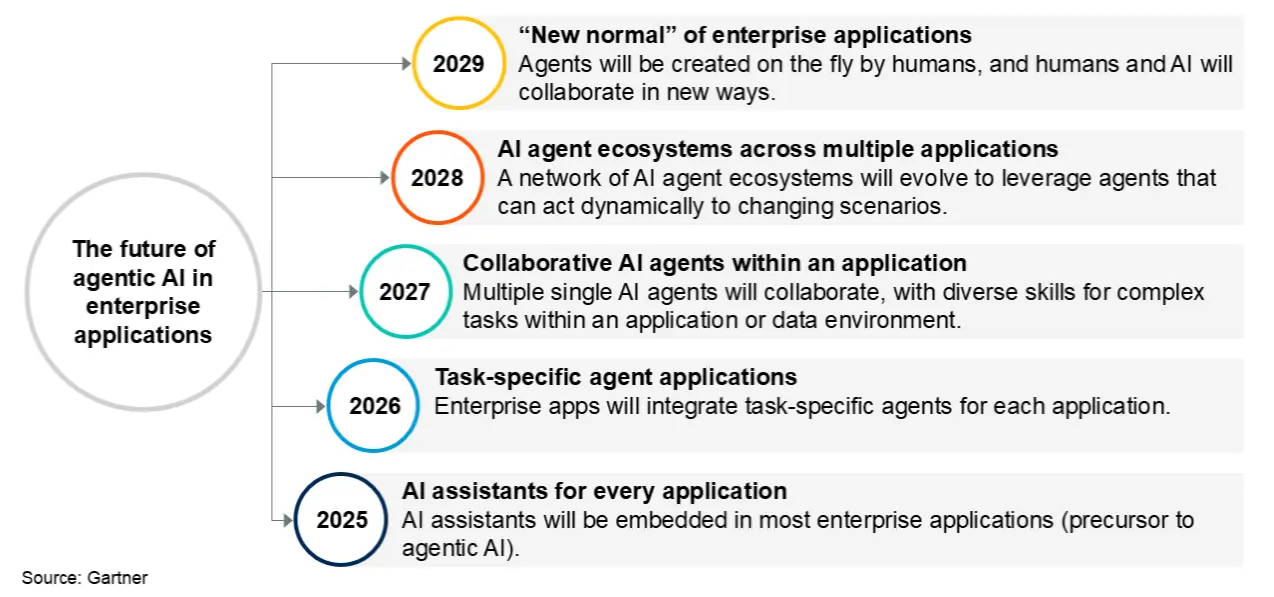
Figure 1: Gartner’s 5-stage timeline showing the shift to task-specific AI agents.
Despite this rapid trend toward agentic AI in enterprise applications, many engineering teams are hitting a wall.
McKinsey’s AI research shows that while over 60% of companies are testing AI agents, very few have successfully launched them in real-world apps because older technical systems get in the way.
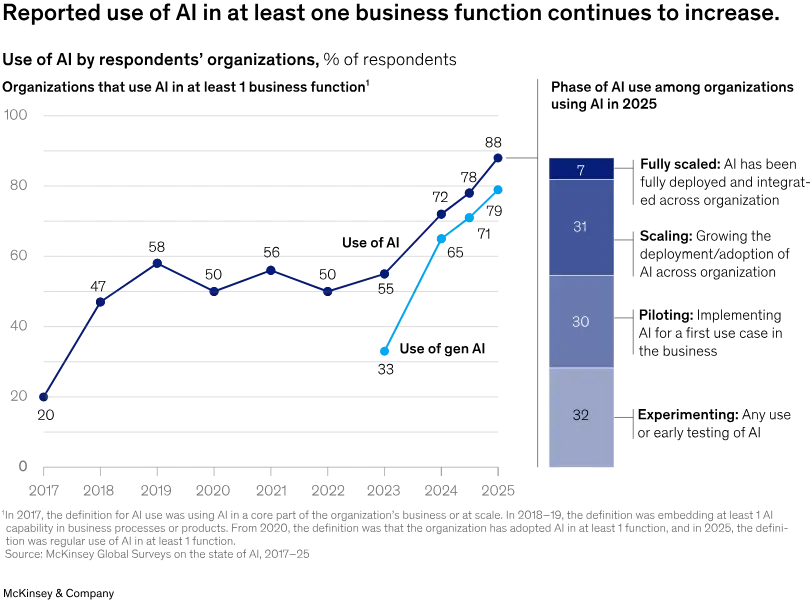
Source: https://www.mckinsey.com/capabilities/quantumblack/our-insights/the-state-of-ai/
Understanding the Difference Between AI Agents vs AI Assistants
| Feature | AI Assistants | Task-Specific AI Agents |
| Primary Function | Respond to user questions with text-based answers. | Perform specific tasks automatically with minimal user input. |
| Interaction Style | Wait for the user to ask a question or give a command. | Proactively execute multi-step workflows once assigned. |
| Task Execution | Provide information, suggestions, or content. | Complete actions such as booking, navigating, or managing workflows. |
| Use of Device Features | Limited use of device capabilities. | Integrate with phone features like the camera, GPS, microphone, and apps. |
| Automation Level | Low — requires user prompts for each action. | High — can independently carry out multiple connected steps. |
| Example | Answering a question, summarizing text, or drafting an email. | Scanning a document with the camera, identifying the location via GPS, and completing a related task automatically. |
This requires a modernized mobile app architecture for AI. If your app relies on slow web connections to run complex AI tasks, it will quickly fall behind.
Traditional Mobile Architecture vs. Agentic Mobile Architecture
Traditional mobile apps were designed to display information and process user requests through cloud servers. Task-specific AI agents, however, need apps that can make decisions, use native device features, and execute multi-step tasks with minimal user input.
This shift requires a modern mobile architecture that balances on-device intelligence with cloud processing for faster, more reliable performance.
| Traditional Mobile Architecture | Agentic Mobile Architecture |
| Cloud-first processing | Hybrid edge-cloud processing |
| Responds to user requests | Executes autonomous tasks |
| Limited use of device features | Uses camera, GPS, sensors, and local storage |
| Internet-dependent | Supports offline execution |
| API-driven workflows | AI-driven tool orchestration |
Key Takeaway: Modern mobile apps must evolve from simply displaying information to enabling AI agents to perform secure, intelligent, and autonomous actions.
The 4 Architectural Pillars of an Agent-Ready Mobile App
1. Smart Work Sharing (Edge vs. Cloud)
Never rely 100% on cloud servers for every small AI action.
On the Phone (Edge): Let the device handle quick, instant tasks (like scanning a document or recognizing a voice command) directly using the phone’s built-in AI chips (NPUs).
In the Cloud: Reserve cloud servers for heavy tasks that require massive databases or long multi-step calculations when Wi-Fi or 5G is stable.
2. Safe Access to Phone Tools
AI agents need to take action, not just answer questions. Your app architecture must convert native phone features, such as the Camera, GPS, Bluetooth, or Secure Storage, into clear, structured tools that the AI agent can safely request to use when executing a task.
3. Interruption-Resilient Memory (Offline Support)
Phones lose signal in elevators, basements, or remote field locations. An agent-ready architecture uses smart event loops that save the AI’s step-by-step progress locally. If the network drops mid-task, the app holds the state and seamlessly resumes once reconnected without losing data.
4. Human-in-the-Loop Safety Guards
Autonomous agents should never run completely unchecked. Modern mobile architectures place strict validation checks between the AI agent and the app’s database. For sensitive actions, like issuing a payment, sending a report, or deleting data, the app must pause and prompt the user for confirmation (e.g., via FaceID or a tap).
Three Costly Mistakes to Avoid
When preparing your enterprise app strategy for AI agents, watch out for these common engineering traps:
- Overheating the Phone: Attempting to run large, unoptimized AI models on client devices causes phones to heat up, drain battery life rapidly, and get force-closed by iOS or Android background limits.
- Assuming Internet is Always Available: Building multi-step agent tasks that fail or reset as soon as a user steps into a spotty network area.
- Flying Blind Without Visibility: Deploying agents without background telemetry to monitor how fast tasks complete, how often tool requests fail, or where errors occur.
Action Steps: How to Upgrade Your Mobile App Strategy
Getting your mobile architecture ready for the 2026 agentic shift doesn’t mean rebuilding your app from scratch. Follow this simple 4-step implementation checklist:
Step 1: Clean Up App Code: Structure your app’s internal functions into clean, modular “tools” so an AI agent can read and interact with them safely.
Step 2: Add Lightweight Local Engines: Integrate lightweight AI runtimes (like CoreML or ExecuTorch) directly into target mobile operating systems to handle quick edge tasks.
Step 3: Build Offline Fallback Loops: Create local state machines that queue up agent actions when the internet drops and automatically retry when back online.
Step 4: Track & Optimize: Set up monitoring tools to track execution speed, battery consumption, and task completion success rates in real time.
Is Your Mobile Architecture Ready?
The jump to 40% enterprise adoption is not a future forecast, it is happening right now. Simply packaging standard web chatbots into mobile wrappers is no longer enough to meet performance standards or user expectations.
The future of enterprise mobile software belongs to applications engineered specifically for task-specific AI agents in mobile apps, apps that act fast, work offline, protect data, and execute complex workflows seamlessly at the edge.
Is your mobile app foundation equipped to handle autonomous AI agents?
Connecting to Ingenious Netsoft
-
Ingenious Netsoft helps businesses modernize legacy mobile applications with AI-ready, edge-first architectures.
The company specializes in custom mobile application development and AI-powered IT solutions for enterprise businesses.
From modernizing existing platforms to developing new AI-enabled mobile applications, Ingenious Netsoft delivers end-to-end design, scalable architecture, and mobile engineering expertise.
Our solutions are built to help organizations deploy secure, high-performing, and autonomous AI agents that enhance user experiences and business efficiency.
Frequently Asked Questions
What is the difference between a mobile AI assistant and a task-specific AI agent?
Why are cloud-only AI models problematic for mobile applications?
What is “agentwashing” in enterprise software?
How do task-specific AI agents work offline on mobile devices?
Does implementing AI agents require completely rebuilding an existing mobile app?
How do mobile AI agents maintain user privacy and security?
What is “Human-in-the-Loop” (HITL) safety in mobile agent architecture?
How do AI agents handle network interruptions mid-task on a mobile phone?
What mobile hardware features can an AI agent access as a “tool”?
How can enterprise leaders evaluate if their app is ready for AI agents?
- Whether core backend endpoints are exposed as tool-callable schemas.
- How the client app handles local NPU/GPU execution for low latency.
- How state loops handle offline-to-online transitions and app backgrounding.