
Ecommerce SEO Guide 2027: 10 Proven Strategies to Rank Higher and Grow Traffic (Updated)
You’re ranking. You might even be pulling in decent impressions. But if that traffic isn’t turning into clicks or clicks into sales, your ecommerce SEO strategy is probably stuck in 2020.
Google changed more in the last 12 months than in the five before it, AI Overviews now appear on roughly 48% of Google searches, up 58% year-over-year (BrightEdge, Feb 2026), and they answer most “how to” and comparison searches before anyone reaches a website. Even a page-3-5 ranking that used to feel like a solid baseline can quietly stop producing clicks.
This 2027 ecommerce SEO guide skips the generic checklists. It’s the exact product-page, technical, and Google Merchant Center fixes we’ve used on real client stores. Skim the checklist below, or read the full breakdown.
TL;DR
Ecommerce SEO in 2027 isn’t just about ranking anymore, it’s product-page optimization, technical fixes, Google Merchant Center visibility, and structuring content so AI Overviews can cite you. This guide covers all four, plus a free checklist and how to tell if your current strategy is actually working.
Table of Contents
- Key Ecommerce SEO Strategies to Increase Traffic in 2027
- 1. Keyword Research for Ecommerce Stores
- 2. Optimize Ecommerce Product Pages
- 3. Get Listed on Google Merchant Center
- 4. Site Structure & Navigation
- 5. Site Speed & Core Web Vitals
- 6. Collection & Category Page SEO
- 7. Blog Content Strategy for Ecommerce
- 8. Image SEO for Ecommerce
- 9. Technical SEO Essentials
- 10. Backlinks for Ecommerce Stores
- 11. AI Search Visibility for Ecommerce
- How Long Should Ecommerce SEO Actually Take?
- Final Verdict
- FAQs
Quick checklist
| Area | What to check |
|---|---|
| Product pages | Unique descriptions, schema markup, optimized images, internal links |
| Site structure | Clear path: Home → Category → Collection → Product |
| Site speed | Core Web Vitals passing, images compressed/WebP, apps audited |
| Technical SEO | XML sitemap submitted, canonical tags correct, no orphan pages |
| Content | Blog targeting real buyer questions, not just keyword variants |
| Google Merchant Center | Product feed live, attributes complete, free listings enabled |
| Backlinks | Links from real ecommerce/industry sites, not just directories |
| AI search | Structured, direct-answer content; FAQ schema; citable data |
Key Ecommerce SEO Strategies to Increase Traffic in 2027
1. Keyword Research for Ecommerce Stores
Skip the trap of treating every near-identical phrase as a separate “keyword”. Google has understood phrasing variants like “ecommerce SEO,” “SEO for ecommerce,” and “SEO on ecommerce” as the same intent for years. Instead, group your research into a few real categories:
- Category/product intent: terms tied to what people are shopping for (“men’s running shoes,” “organic skincare”)
- Informational intent: questions your buyers ask before purchasing (“how to choose running shoes for flat feet”)
- Comparison intent: “X vs Y,” “best [product] for [use case]”
- Commercial/service intent: relevant if you’re targeting people looking to hire help, like “ecommerce SEO agency”
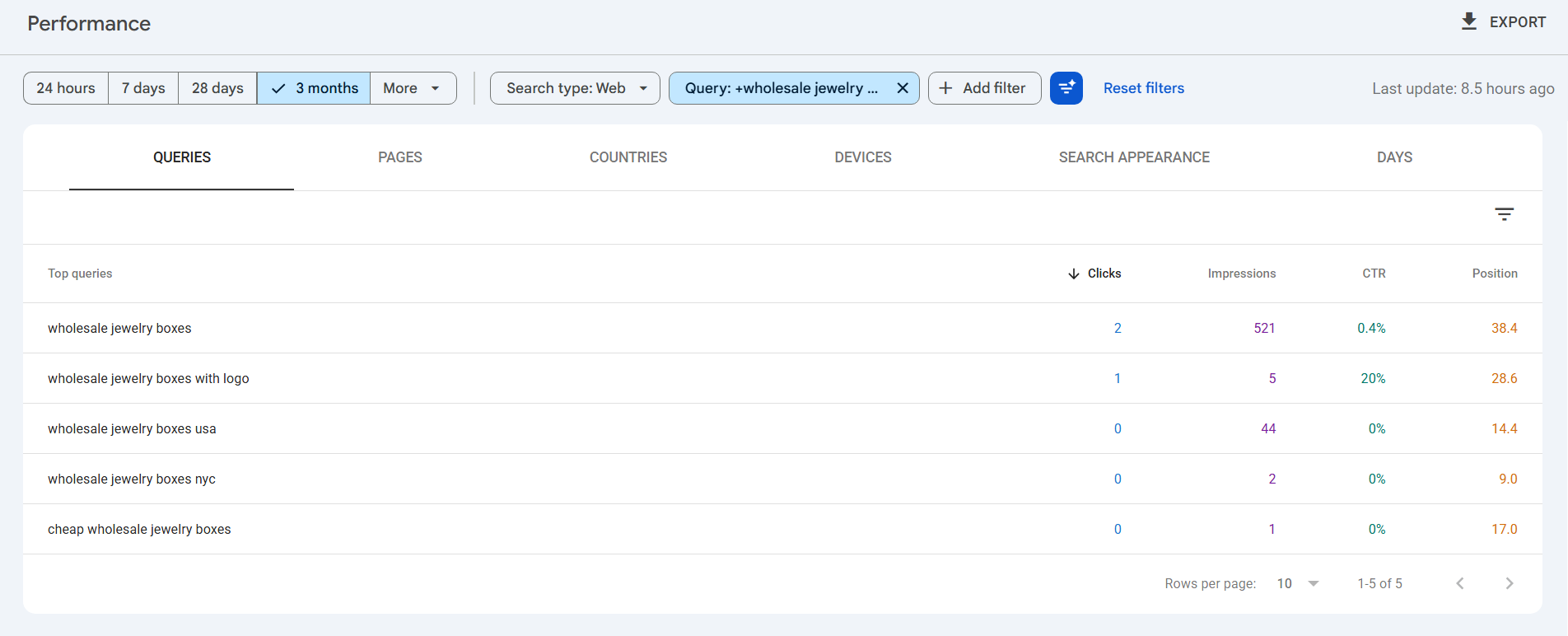
Use Search Console’s own query data as your primary source, it tells you what you’re already partially ranking for, which is usually a faster win than chasing brand-new terms.
2. Optimize Ecommerce Product Pages
Product pages are where SEO and revenue meet directly, they’re the pages Google sends buyers to, and the pages that convert. Generic advice like “write unique descriptions” isn’t enough on its own. Here’s what actually moves rankings and conversions:
- Write descriptions for the specific buyer question, not just the product: Instead of restating specs, answer what someone searching that product actually wants to know, fit, durability, use case, comparison to alternatives.
- Add Product structured data (schema.org/Product) with price, availability, and review markup — this is what unlocks star ratings and price display directly in search results, which measurably increases CTR.
- Compress and rename image files before upload: e.g. mens-running-shoes-navy-side.webp, not IMG_4213.jpg. Aim under 150-200KB per image without visible quality loss.
- Link 3-5 related products contextually within the description, not just in a generic “you may also like” carousel, contextual in-content links carry more SEO weight.
3. Get Listed on Google Merchant Center
Organic rankings aren’t the only way Google sends buyers to your store. Google Merchant Center (GMC) is what powers the Shopping tab, the product grid that shows up above organic results for product searches, and free product listings across Search and Google Images — and unlike Shopping ads, the free listings don’t cost anything per click. For an ecommerce store, this is often an easier and faster win than organic ranking, because you’re not competing against 10 blue links — you’re competing for a spot in a visual product grid with far fewer players.
Why it matters alongside SEO, not instead of it:
- Your GMC product feed and your on-page Product schema markup should match — inconsistent price, availability, or GTIN data between the two is one of the most common reasons products get disapproved or suppressed.
- Buyers searching product-specific terms increasingly see the Shopping grid before they see traditional results — so showing up there recovers visibility even on searches where your organic ranking is weak.
How to set it up properly:
- Create a Merchant Center account and verify + claim your site URL.
- Submit a product feed — via a direct feed file, your ecommerce platform’s native integration (Shopify, WooCommerce, Magento all have one), or the Content API for larger catalogs.
- Fill in every required attribute accurately: title, description, price, availability, GTIN/MPN, brand, product category, and high-resolution images.
- Enable free listings (separate from paid Shopping ads, turn this on by default).
- Keep the feed synced automatically, a stale feed (wrong stock/price) gets products suppressed without any obvious error on your website.
- Monitor the Diagnostics tab weekly, disapproved products and account-level issues show up here first, often before you’d notice a traffic drop.
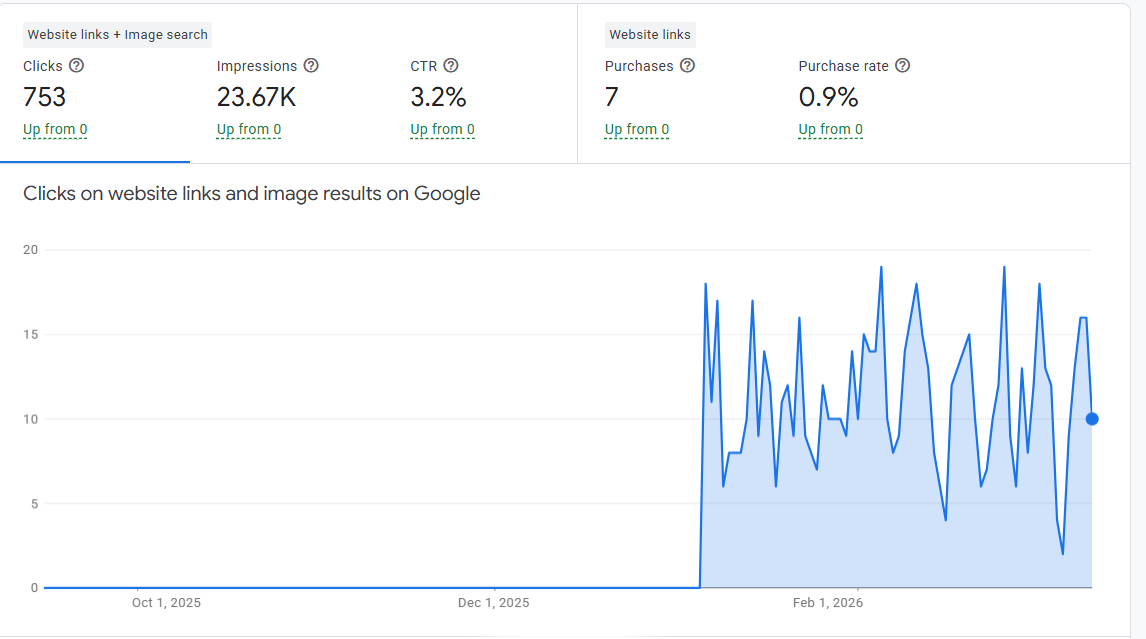
Before:
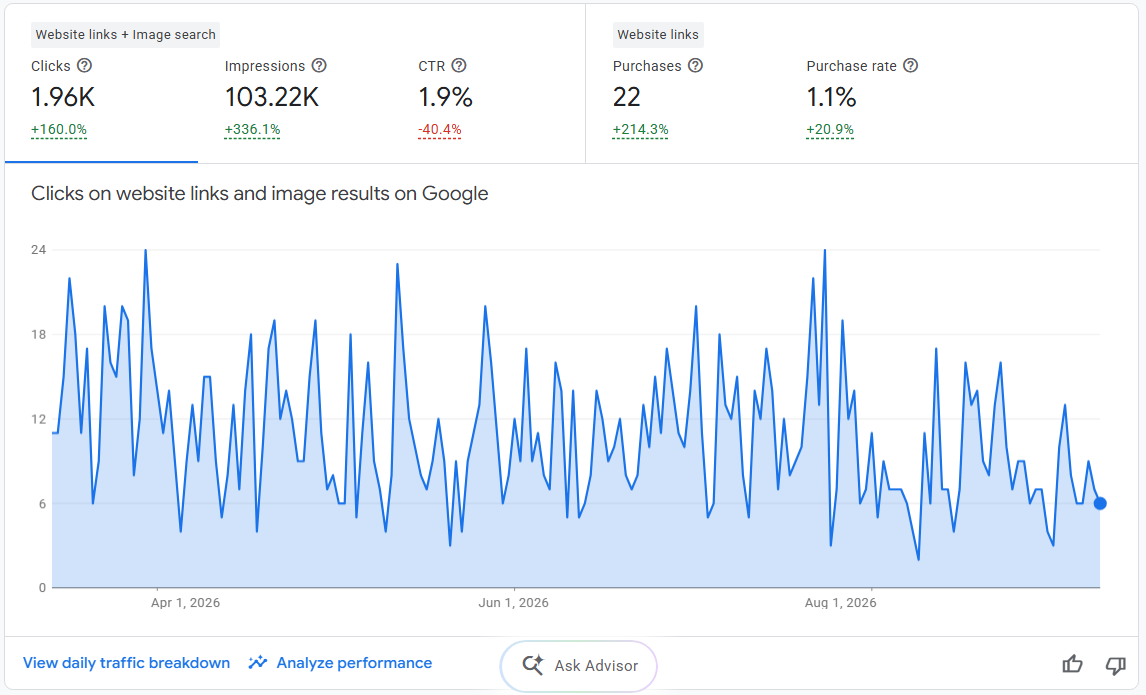
After:
4. Site Structure & Navigation
If Google (or a buyer) can’t reach a product in a few clicks, it doesn’t matter how well that page is optimized. Structure problems are one of the most common reasons large catalogs underperform relative to their content quality.
- Keep products within 3 clicks of the homepage. Home → Category → Subcategory → Product is the standard depth; anything deeper gets crawled less often and passes less authority.
- Use a logical, consistent category hierarchy that matches how customers actually think about your catalog — not how your internal inventory system is organized.
- Add breadcrumb navigation with BreadcrumbList schema on every product and category page — this helps both crawling and how your listing displays in search results.
- Make sure mega menus are crawlable HTML links, not JavaScript-only dropdowns that require a click/hover event to render, Google can miss these during crawling.
- Keep your XML sitemap in sync with your actual structure, remove discontinued/redirected URLs promptly rather than letting the sitemap drift out of date.
5. Site Speed & Core Web Vitals
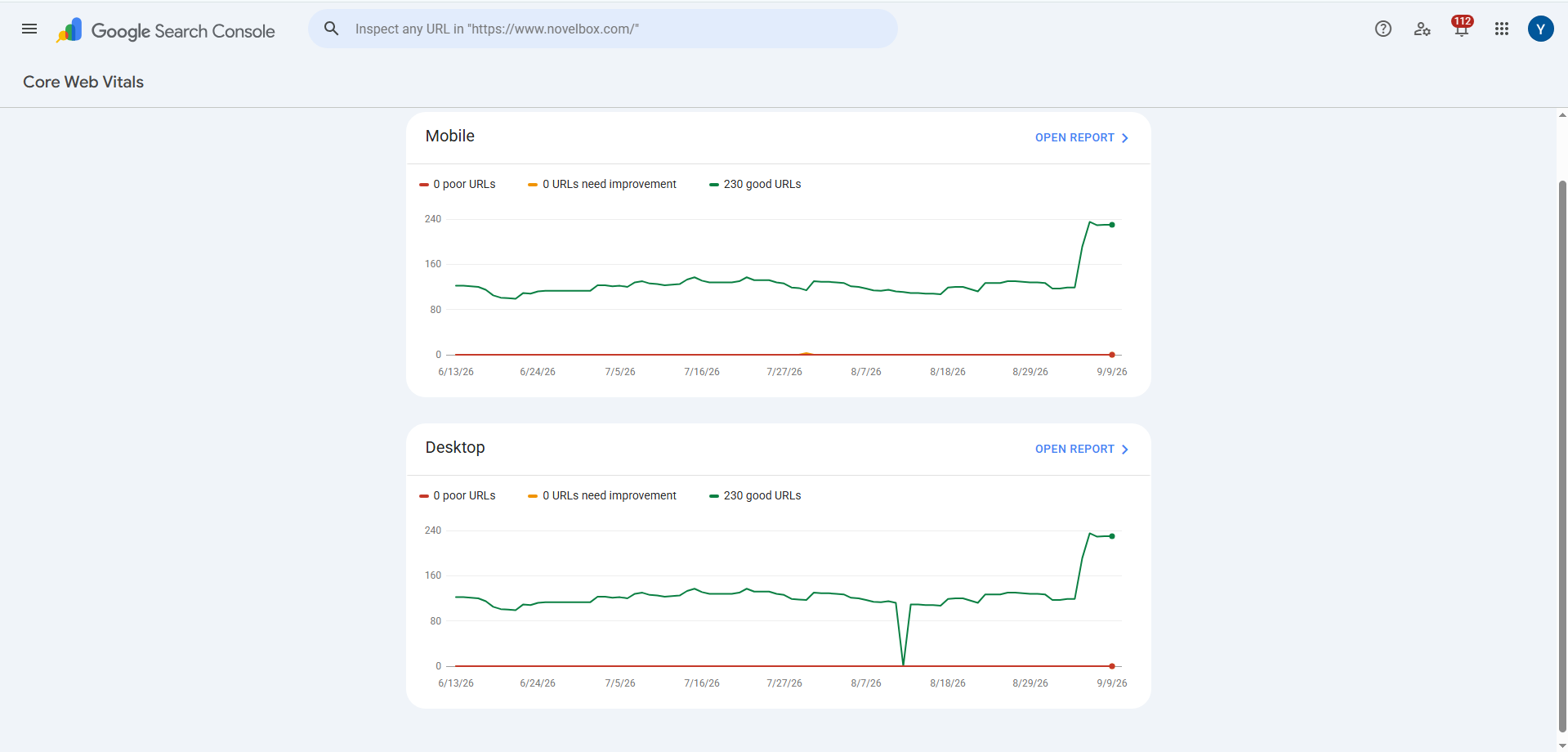
Site speed is both a ranking factor and a conversion factor, slow pages lose sales before they ever lose rankings. Google’s current Core Web Vitals thresholds:
- LCP (Largest Contentful Paint): under 2.5 seconds
- INP (Interaction to Next Paint): under 200 milliseconds
- CLS (Cumulative Layout Shift): under 0.1
For ecommerce specifically, the biggest speed killer is usually app bloat, every third-party app you install (reviews widgets, upsell popups, chat tools, trackers) adds its own scripts, and most stores never audit which ones are still needed. If you haven’t already, this is worth a dedicated look: see our related guide on fixing Shopify app bloat for a practical audit framework.
Other fast wins:
- Compress and serve images in WebP/AVIF with responsive sizing
- Lazy-load below-the-fold images and non-critical scripts
- Minify CSS/JS and remove unused code from your theme
- Use a CDN for static assets
6. Collection & Category Page SEO
Category pages get treated as an afterthought on a lot of ecommerce sites — thin, duplicate, or entirely auto-generated with no unique content. That’s a missed opportunity, since collection pages often have far more ranking potential than individual product pages for broader, higher-volume search terms.
- Write a genuinely unique description for each major collection page (100-300 words), not a copy-pasted template with the category name swapped in.
- Handle pagination and filters carefully — filtered/sorted URLs (?color=blue&sort=price) should generally be canonicalized back to the main collection URL to avoid duplicate content and wasted crawl budget.
- Add ItemList structured data where relevant to help Google understand the collection’s contents.
- Compress and serve images in WebP/AVIF with responsive sizing directly within the collection description, not just via the product grid.
7. Blog Content Strategy for Ecommerce
Blog content should exist to capture buyers earlier in their journey and guide them toward a product — not to exist as a disconnected content arm chasing generic traffic.
- Target real pre-purchase questions, not just keyword variants of your homepage term (this is exactly the trap this guide itself was falling into before the rewrite).
- Link contextually from blog posts to the specific product or collection pages they relate to — a post about “how to choose running shoes for flat feet” should link directly to your relevant shoe category, not just your homepage.
- Repurpose real customer questions (from support tickets, reviews, or sales calls) into blog topics — these tend to match actual search intent better than keyword-tool suggestions alone.
- Avoid publishing content with no path back to a product — if a post can’t reasonably link to something you sell, it’s probably not the right topic for an ecommerce blog specifically.
8. Image SEO for Ecommerce
With large catalogs, images are often the single biggest neglected SEO asset — and a real opportunity for image search and AI-driven visual search traffic.
- Use descriptive, human-readable filenames — womens-leather-crossbody-bag-tan.webp, not IMG_2041.jpg.
- Write alt text that describes the image, not a keyword-stuffed list — “Tan leather crossbody bag with adjustable strap” beats “leather bag ecommerce SEO tan bag buy online.”
- Compress and serve responsive sizes (srcset) so mobile users aren’t downloading desktop-sized images.
- Use original product photography where possible — stock or manufacturer-supplied images duplicated across dozens of competing stores don’t differentiate you in image search.
- Submit an image sitemap if your catalog is large enough that individual product images might otherwise be missed in crawling.
9. Technical SEO Essentials
The unglamorous but foundational layer — most of the strategies above won’t matter if these basics are broken.
- Keep your XML sitemap accurate and submitted in Search Console; update it as products are added or discontinued.
- Check robots.txt isn’t accidentally blocking important pages (a surprisingly common issue after platform migrations or theme changes).
- Canonicalize product variant URLs (color/size parameters) to the main product page to avoid duplicate content across your catalog.
- Handle out-of-stock and discontinued products deliberately — don’t let them silently 404. Either keep the page live with clear messaging and alternative product suggestions, or 301 redirect to the closest replacement/category.
- Confirm mobile-first indexing is working correctly — check that your mobile site shows the same content and structured data as desktop.
- Validate structured data regularly using Google’s Rich Results Test, especially after theme or app updates that can silently break markup.
10. Backlinks for Ecommerce Stores
Backlinks remain one of the strongest ranking signals, but most ecommerce stores rely almost entirely on low-value profile or directory links, which carry little topical weight. Real link building for ecommerce usually comes from:
- Digital PR — pitching a genuinely newsworthy angle (a data study, a seasonal trend analysis, a founder story) to relevant publications
- Product reviews and influencer/creator placements — a real review on a niche blog or YouTube channel earns a contextual, relevant link
- Supplier, manufacturer, and partner links — if you carry specific brands, ask to be listed as an authorized retailer on their site
- Guest posts on industry-relevant blogs — not spun or low-quality guest post networks, but genuine contribution to sites your actual customers read
- Journalist requests (HARO-style platforms) — a fast way to earn links from high-authority publications when a relevant story comes up
Avoid link farms, PBNs, or bulk directory submissions — for a domain already sitting on a thin backlink profile, quality here matters far more than volume.
11. AI Search Visibility for Ecommerce
A growing share of shopping-related searches now get answered inside Google’s AI Overviews or AI Mode before a user ever sees the traditional results list. Ranking well is no longer the whole game — being the source an AI answer cites matters just as much, and cited pages tend to see meaningfully higher click-through than pages that only rank.
To improve your odds of being cited:
- Structure key sections with a clear, direct answer in the first 1-2 sentences, followed by supporting detail — AI systems extract this pattern most reliably.
- Add FAQPage schema to genuine Q&A content.
- Include specific, checkable facts (numbers, steps, named tools) rather than vague claims — these are what get quoted.
See our related guide: Why Isn’t My Site Showing Up in Google AI Overviews for a deeper walkthrough.
How Long Should Ecommerce SEO Actually Take?
One of the most common reasons store owners give up on SEO too early is unclear expectations. A realistic timeline looks roughly like this:
- Month 1: technical fixes (crawl errors, indexing issues, broken sitemaps)
- Month 2: on-page optimization (product pages, category structure, content)
- Month 3: first ranking movement on lower-competition terms
- Months 4-6: measurable traffic growth
- Months 6-12: revenue impact becomes clear
If you’re four-plus months in with no movement on any of these, something in the strategy needs to change — not necessarily more time. We covered the specific warning signs and what to check in your own reporting in Ecommerce SEO Agency Not Delivering? Here’s Why, including what your agency should be showing you at each stage and the questions worth asking if they aren’t.
Final Verdict
Four months is enough time to see whether an ecommerce seo specialist knows what they are doing. You should have seen a technical audit, on-page optimizations, structured data implementation, and first signs of ranking movement. If none of that has happened, your agency is failing you.
The best ecommerce seo consultants fix technical debt first, then build authority through quality backlinks and content, and now in 2026, also optimize for AI visibility. They do not promise rankings in 30 days. They show you clear, measurable progress by month three.
You do not have to settle for an agency that delivers nothing.
At Ingenious Netsoft, we specialize in ecommerce SEO. We do not take on every client. We focus on online stores that need real results.
What We Do Differently:
- Technical audit first: We fix what is broken before trying to rank
- Product page focus: We optimize the pages that actually drive revenue
- Commercial keywords only: No traffic for traffic’s sake. We target buyers.
- AI visibility strategy: We get your products cited in AI Overviews and answer engines
- Transparent reporting: You get live access to all data. No hiding.
- Monthly accountability: You see exactly what we did and what changed
Stop wasting money on agencies that do not deliver. Get a free, no-obligation Ecommerce SEO Audit. We will analyze your site, show you exactly what is wrong, and give you a clear roadmap to results.
Get Your Free Ecommerce SEO Audit
FAQ
What is eCommerce SEO?
Can eCommerce stores rank well on Google?
Why is ecommerce SEO important for online stores?
What does an eCommerce SEO agency do?
How long does eCommerce SEO take to show results?
Should I hire eCommerce SEO experts?
What are the most important eCommerce SEO ranking factors?
Key ranking factors include:
- Keyword optimization
- Product page SEO
- Site speed
- Mobile optimization
- Backlinks
- Quality content
These elements form the foundation of successful ecommerce SEO services.


