
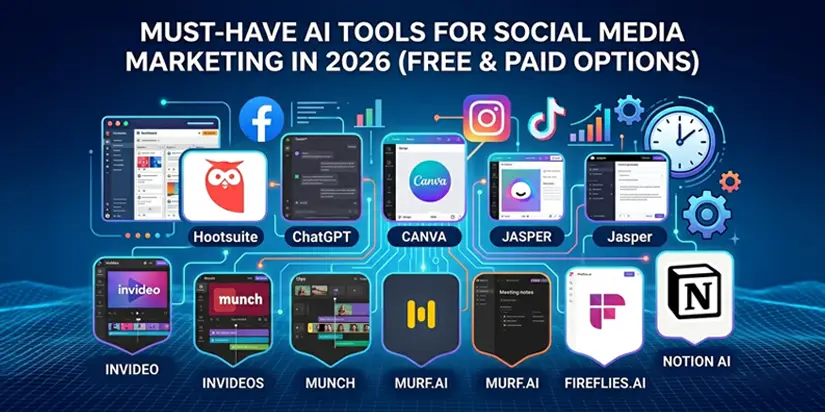
Must-Have AI Tools for Social Media Marketing in 2026 (Free & Paid Options)
You’re managing multiple platforms. Deadlines are tight. Content needs to go out daily. And your team is stretched thin. Meanwhile, competitors are posting faster, engaging better, and growing their audiences, without adding headcount.
In 2026, AI will no longer a “nice to have.” AI marketing revenue is projected to pass $107 billion by 2028, and social media teams that ignore AI are falling behind. But with dozens of tools claiming to be the best, where do you start?
This guide covers the best AI tools for social media, free and paid, across content creation, design, video, voiceovers, and productivity. You’ll learn what each tool does, who it’s for, and how to integrate AI into your workflow without losing your brand voice.
Table of Contents
- What Are AI Tools for Social Media Marketing?
- Why Use AI Tools for Social Media Marketing in 2026
- Best AI Tools for Social Media – At a Glance
- Best AI Tools for Content Creation
- Best AI Tools for Image Editing and Design
- Best AI Tools for Video
- Best AI Tools for Voiceovers and Audio
- Best AI Tools for Productivity
- Tips from Social Media Managers for Using AI Tools
- Final Thoughts
- Frequently Asked Questions (FAQs)
What Are AI Tools for Social Media Marketing?
AI tools for social media marketing are software applications that use machine learning, natural language processing, or computer vision to help you create, manage, optimize, or analyze social media content.
What they can do:
- Generate captions, hashtags, and post ideas
- Create and edit images, videos, and voiceovers
- Schedule posts at optimal times
- Analyze performance and sentiment
- Transcribe meetings and turn them into content
AI doesn’t replace human creativity, it amplifies it. It handles repetitive tasks so you can focus on strategy, storytelling, and community building.

Why Use AI Tools for Social Media Marketing in 2026
Here’s why the best AI tools for social media are essential for modern marketing teams:
- Automate repetitive tasks
AI handles rewrites, caption variations, and content repurposing in seconds. Teams save 5–10 hours per week on manual work.
- Brainstorm content ideas faster
Never stare at a blank page again. AI suggests prompts, angles, and formats based on your brand and audience.
- Support content creation at scale
From image generation to video editing, AI tools for content creation speed up production without sacrificing quality.
- Analyze performance in real time
AI processes large data sets in minutes, helping you understand what works and why.
- Scale without extra headcount
With social media automation tools, you can produce more content, post more frequently, and engage better, with the same team size.
Best AI Tools for Social Media – At a Glance
| Tool | Best For | Pricing |
|---|---|---|
| Hootsuite | All-in-one social media management | Free trial + paid |
| ChatGPT | Content creation, ideation | Free + paid |
| Canva | Design and image editing | Free + paid |
| Jasper | Marketing copywriting | Paid |
| Invideo | Text-to-video creation | Free + paid |
| Munch | Repurposing long-form video | Paid |
| Murf.ai | Voiceovers | Free + paid |
| Fireflies.ai | Meeting transcription | Free + paid |
| Notion AI | Productivity & organization | Free trial + paid |
These AI social media tools cover every stage of your workflow, from brainstorming to publishing to analysis.
Best AI Tools for Content Creation
- ChatGPT– The Versatile Writing Assistant
ChatGPT generates captions, blog post ideas, and repurposes existing content. It’s widely used for drafting posts and building content calendars.
Limitation: Output can feel generic without detailed prompts. Always edit and fact-check.
Pricing: Free; $20/month for advanced models
Best for: Content creators and marketing teams
- Jasper – AI Copywriting with Brand Guardrails
Jasper offers 100+ specialized AI agents for landing pages, social posts, and translations. It maintains your brand voice across all content, even as you scale.
Pricing: Starts at $49/month
Best for: Copywriters and marketing teams scaling content
- Wordtune – Rewriting and Summarizing
Wordtune improves tone, tightens sentences, and summarizes long content (blogs, PDFs, YouTube videos). It’s perfect for polishing LinkedIn posts.
Pricing: Free; paid from $6.99/month
Best for: Long-form content writers and LinkedIn marketers
Best AI Tools for Image Editing and Design
- Canva – Design for Non-Designers
Canva’s AI generates images, removes backgrounds, and recommends templates. Generate up to 50 images on the free plan.
Pricing: Free; Pro from $15/month
Best for: Content creators, small teams, solo marketers
- Magic Studio – Product Photos and Object Removal
Magic Studio creates professional product backgrounds, removes unwanted objects, and generates profile photos, ideal for e-commerce brands.
Pricing: Free; paid from $4.99/month
Best for: E-commerce brands and influencers
- Stockimg.ai – Custom Visuals on Demand
Tired of generic stock photos? Stockimg.ai generates custom stock photos, illustrations, logos, and posters from text prompts.
Pricing: Free; paid from $19/month
Best for: Marketers who need unique visuals fast
Best AI Tools for Video
- Lumen5 – Turn Blog Posts into Videos
Upload a blog post or script, Lumen5’s AI generates a video with stock footage, music, and voiceover. Perfect for repurposing long-form content.
Pricing: Free; paid from $19/month
Best for: B2B marketers repurposing written content
- Invideo – Text-to-Video for Social Clips
Type a prompt, get a publish-ready video for TikTok, Reels, or YouTube. Invideo adds stock footage, voiceover, and transitions automatically.
Pricing: Free; paid from $15/month
Best for: Marketers, podcasters, and content creators
- Munch – Repurpose Long-Form Video
Munch’s AI identifies the most engaging parts of your long videos and turns them into short clips with subtitles. A game-changer for short-form strategy.
Pricing: From $49/month
Best for: Teams scaling short-form video content
- Synthesia – AI Avatars and Voiceovers
Create videos with AI avatars, no cameras or studio needed. Synthesia supports multiple languages, making it ideal for global campaigns.
Pricing: Free; paid from $22/month
Best for: Explainer videos, training content, product marketing
Best AI Tools for Voiceovers and Audio
- Riffusion – AI Music Generator
Generate original background music for Reels, TikToks, and videos from text prompts. No more scrolling through audio libraries.
Pricing: Free
Best for: Video content creators
- Murf.ai – Realistic Voiceovers
Murf.ai offers 120+ voices across 20+ languages. Generate voiceovers for tutorials, ads, and social videos without hiring talent.
Pricing: Free; paid from $19/month
Best for: Product marketers, educators, video creators
Best AI Tools for Productivity
- Fireflies.ai – Meeting Assistant
Fireflies.ai records, transcribes, and summarizes meetings from Zoom, Google Meet, and Teams. Turn brainstorming calls into content briefs instantly.
Pricing: Free; paid from $10/month
Best for: Social media and marketing teams
- Notion AI – All-in-One Workspace
Notion AI helps brainstorm ideas, create content calendars, write briefs, and organize campaigns – all inside your existing Notion workspace.
Pricing: Free trial; paid from $20/month
Best for: Content creators and marketing teams
Tips from Social Media Managers for Using AI Tools
Real social media managers share how they get the most out of AI tools for social media marketing.
1. Automate Repetitive Tasks, Not Creativity
Use AI for first drafts, transcriptions, image resizing, and data entry. Keep strategy, storytelling, and emotional connection human. AI handles the grind, you handle the genius.
2. Save Effective Prompts for Consistency
Once you find a prompt that delivers great results, save it in a document or spreadsheet. Reusing proven prompts saves time and ensures your AI outputs stay on-brand across multiple posts.
3. Train Your AI Tool on Your Brand
Feed your AI tool your brand guidelines, tone of voice, past top-performing posts, and customer FAQs. Better input leads to more relevant, on-brand output, less editing, more publishing.
4. Stay Compliant with Platform Rules
Some platforms (like YouTube) require disclosure of AI-generated content. Familiarize yourself with each network’s terms. Violating rules can get your content taken down or your account restricted.
5. Use AI for Smarter Content Planning
AI tools for content planning can analyze your top-performing posts, identify content gaps, and suggest future topics based on audience behavior. Let data guide your calendar, not guesswork.
6. Never Skip Human Review
AI-generated captions and images should always be reviewed by a human. Fact-check statistics, personalize generic phrasing, and ensure the content sounds like your brand, not a robot.
7. Combine Multiple AI Tools for Best Results
No single tool does everything. Use ChatGPT for captions, Canva for visuals, and Hootsuite for scheduling. The best AI tools for social media work together, not in isolation. Build a workflow, not a collection.
Final Thoughts
AI isn’t a magic wand, it’s a force multiplier. The best AI tools for social media help you create more content, post at the right times, analyze performance, and scale without burning out your team.
But tools alone aren’t enough. You need a strategy that aligns AI efficiency with human creativity. That’s where Ingenious Netsoft comes in.
We help businesses:
- Audit your current social media workflow for automation opportunities
- Set up and train your team on the right AI social media tools
- Create custom content workflows that combine AI speed with authentic brand voice
- Measure and optimize performance using AI tools for social media analytics
Ready to stop guessing which AI tools to use? Get a free, no-obligation social media AI readiness assessment.
Get Your Free AI Social Media Audit


