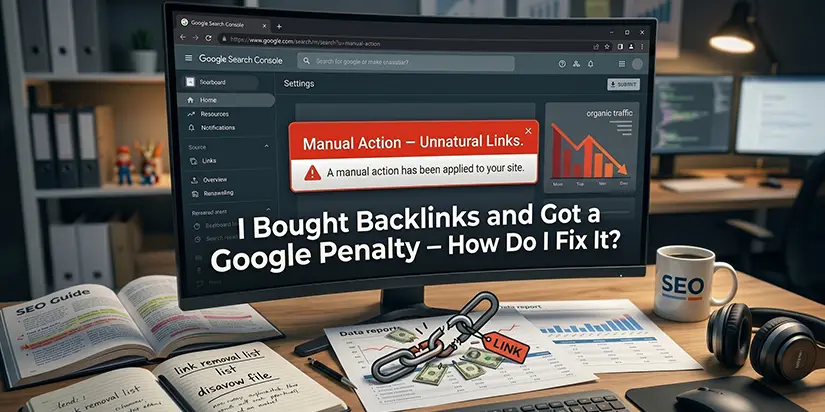
I Bought Backlinks and Got a Google Penalty — How Do I Fix It?
You wake up.
Check your traffic.
It is down 60% overnight.
You open Google Search Console.
A red warning stares back: “Manual Action – Unnatural Links.”
Your heart sinks. You bought backlinks a few months ago. Now Google caught you.
Table of Contents
Buying backlinks is against Google’s rules. It always has been. But many website owners still do it. Some get away with it for years. Others get caught. If you are reading this, you are in the second group.
Here is the good news. A manual action for unnatural links is fixable. Google does not want to ban you forever. They want you to clean up the mess. According to a 2024 study by SEO.ai, 61.5% of SEO professionals admitted to buying backlinks, but only 28% had been penalized. If you are in that 28%, this guide is for you.
We will walk you through exactly how to recover. Step by step. No fluff. No guesswork.
Why Google Penalizes Bought Backlinks
Google’s Rule on Paid Links
Google’s guidelines are clear. Any link that passes PageRank and is bought, sold, or exchanged for money violates their policies. This includes direct payments, free products, or any other incentive.
Backlinks are supposed to be votes of confidence. When you buy them, you fake those votes. That manipulates search results. Google’s algorithms and human reviewers are getting better at catching this every year.
The Two Types of Link Penalties
| Penalty Type | How You Know | Recovery Path |
| Manual Action | Red notification in Search Console. Google tells you exactly what is wrong. | Fix links → Submit reconsideration request |
| Algorithmic (Penguin) | Traffic drops but no notification. Google’s algorithm devalued your links. | Clean links → Wait for next algorithm refresh |
This blog focuses on manual action penalties. But the link cleanup steps apply to both.
What the Manual Action Notice Looks Like
In Google Search Console, go to Security & Manual Actions. If you have a link scheme penalty, you will see something like:
“Manual Action: Unnatural links to your site”
Google will tell you which pages or your whole site is affected. This is the penalty level. A site-wide penalty is more severe than a partial one.
According to Google’s own documentation, ignoring a manual action can lead to your site being completely deindexed. So do not wait. Act now.
How to Confirm You Have a Link Penalty
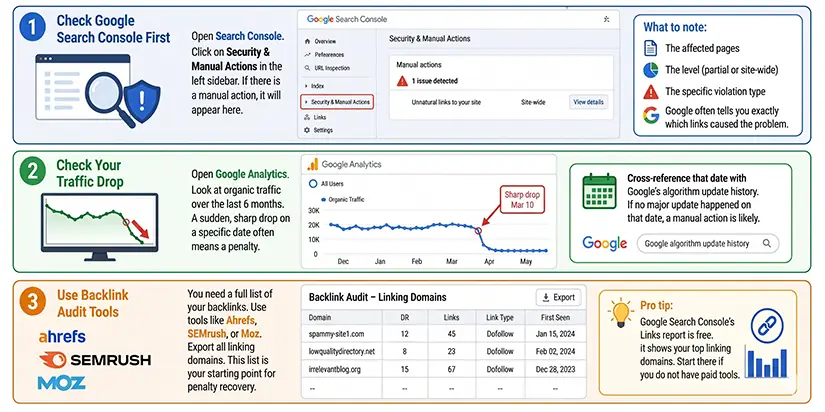
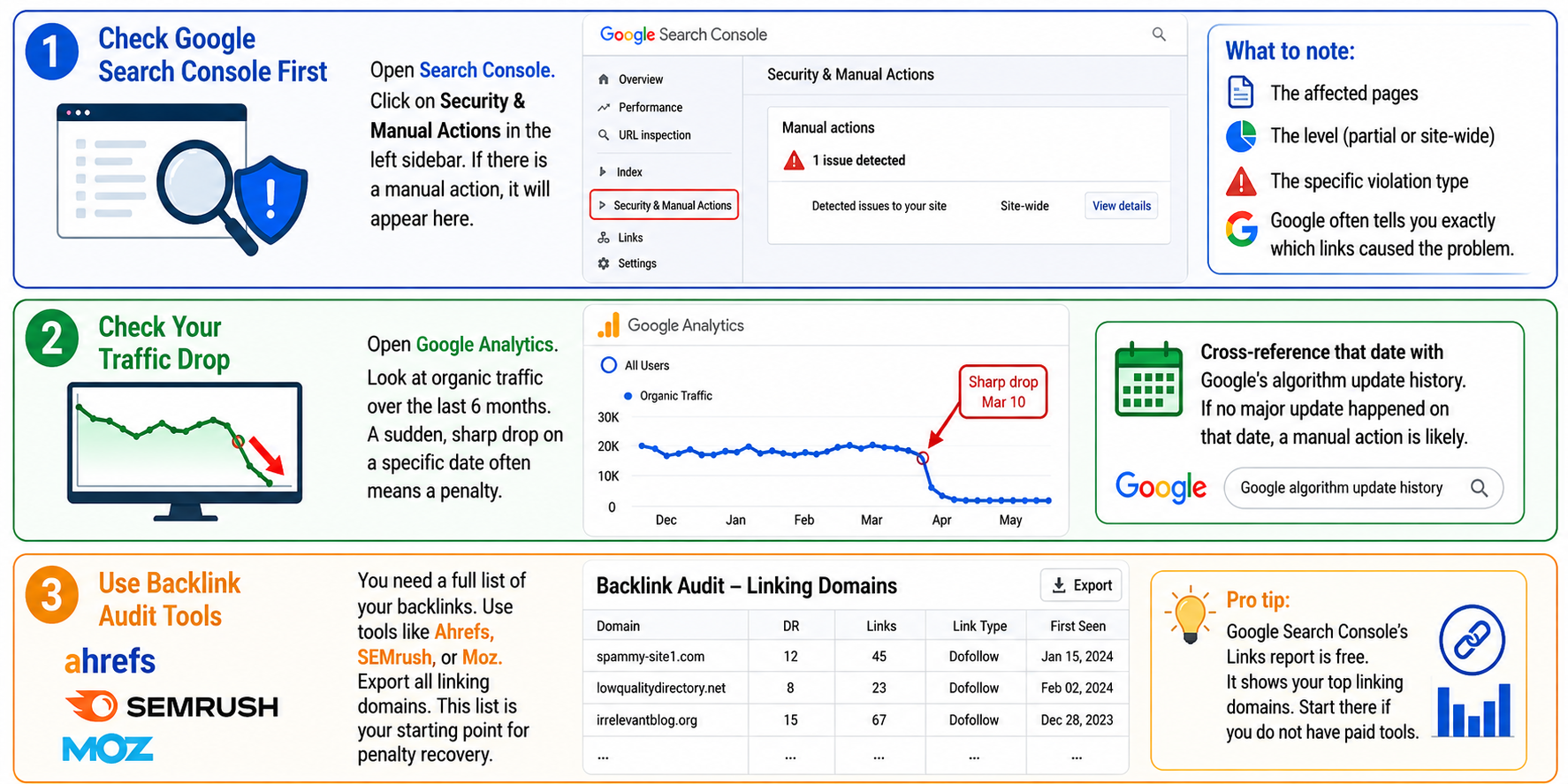
1. Check Google Search Console First
Open Search Console. Click on Security & Manual Actions in the left sidebar. If there is a manual action, it will appear here.
What to note: The affected pages. The level (partial or site-wide). The specific violation type. Google often tells you exactly which links caused the problem.
2. Check Your Traffic Drop
Open Google Analytics. Look at organic traffic over the last 6 months. A sudden, sharp drop on a specific date often means a penalty.
Cross-reference that date with Google’s algorithm update history. If no major update happened on that date, a manual action is likely.
3. Use Backlink Audit Tools
You need a full list of your backlinks. Use tools like Ahrefs, SEMrush, or Moz. Export all linking domains. This list is your starting point for penalty recovery.
Pro tip: Google Search Console’s Links report is free. It shows your top linking domains. Start there if you do not have paid tools.
Step-by-Step Recovery Process
Step 1: Audit Your Backlink Profile
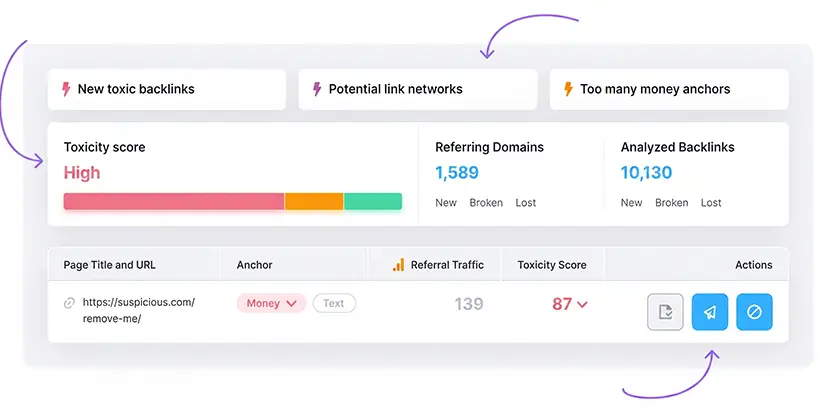
You cannot fix what you do not know. Export every backlink pointing to your site. This is called a link audit.
What to look for:
- Links from low-quality or irrelevant sites (casino, porn, payday loans, etc.)
- Links with over-optimized anchor text (exact match keywords like “cheap running shoes”)
- Links from link scheme farms or private blog networks (PBNs)
- Links from foreign language sites with no connection to your content
- Links from sites with zero traffic or Domain Authority below 10
Create three lists:
- Keep: Natural, relevant, high-quality links
- Remove: Toxic backlinks you can try to delete
- Disavow: Toxic links you cannot remove
Using ai backlink audit tools can speed up this process. These tools scan your backlink profile and flag suspicious links automatically. However, always review their recommendations manually. AI can make mistakes.
Step 2: Remove Toxic Links (Outreach)
For links on the “remove” list, find the website owner’s contact email. Send a polite removal request. This is called link cleanup.
Email template (short):
Subject: Please remove a link to my site
Hello,
I am cleaning up my site’s backlink profile after a Google penalty. Your site currently links to mine at [URL]. Could you please remove this link?
Thank you for your help.
Keep a record: Save every email you send. Note which links were removed and which were ignored.
If you hire professional seo backlink services, they will handle this outreach for you. They have templates and follow-up systems to maximize removal rates.
Step 3: Create Your Disavow File
For links you could not remove, use Google’s disavow tool.
Format your file correctly:
# Links I could not remove
domain:spamysite.com
domain:lowqualityblog.net
Each domain or URL on its own line. Use domain: to block an entire domain. Add comments with # to track your work.
Do not disavow safe links. If you are unsure, get a second opinion. Many backlink seo services include disavow file creation as part of their package.
Step 4: Submit Your Disavow File
Go to Google’s disavow tool (in Search Console under “Index”). Select your property. Upload your .txt file.
Google takes a few days to a few weeks to process disavowed links, so results won’t appear immediately. You can monitor the status in Google Search Console for updates.
If the issue persists or you’re unsure about the quality of backlinks, it’s always better to consult or ask your expert SEO agency for a more detailed audit and corrective strategy.
Step 5: Submit a Reconsideration Request
This is the final step for a manual action. Go back to Security & Manual Actions. Click “Request Review.”
What to include in your request:
- What you did (bought links)
- What you fixed (removed or disavowed specific links)
- Evidence (link audit spreadsheet, outreach emails sent)
- Commitment to follow Google’s guidelines going forward
Be honest. Google’s reviewers have seen every excuse. A clear, truthful request is more likely to be approved.
Important: The reconsideration request only removes the penalty. It does NOT automatically recover your rankings. You still need to build quality backlinks over time.
If this process feels overwhelming, professional seo backlinks services can manage the entire reconsideration request for you. They know what Google’s reviewers want to see.
What to Expect After Submitting
Timing
Manual action reviews take anywhere from a few days to several weeks. Google does not guarantee a specific timeline.
Do not submit multiple requests. It will not speed up the process. It may annoy the reviewer.
Possible Outcomes
| Outcome | What It Means | Next Step |
| Approved | Penalty removed. Your site is back in the index. | Focus on earning real backlinks |
| Rejected | Google still sees bad links. | Re-audit your backlinks. Find missed toxic links. Submit again |
| No response | Still in queue. Wait 2-3 weeks before following up. |
Recovery Does Not Happen Overnight
Once the penalty is gone, your rankings may not return right away. Google needs time to recrawl and reassess your site. This can take weeks or months.
Do not buy more links. That will trigger another penalty, and Google will be less forgiving the second time. According to Google’s John Mueller, repeated violations can lead to permanent deindexing.
How to Build Safe Backlinks Going Forward
What Not to Do
- Do not buy links again
- Do not use automated link-building software
- Do not participate in link exchanges or link scheme
- Do not post spammy comments with your link
What Actually Works (White Hat)
| Tactic | How It Works | Effort Level |
| Guest posts on real blogs | Write useful content for relevant sites in your industry | Medium |
| Digital PR | Create original data or research that journalists want to cite | High |
| Broken link building | Find broken links on other sites. Offer your content as a replacement | Medium |
| Resource page links | Get listed on legitimate resource pages in your niche | Low |
| Unlinked brand mentions | Find where people mention your brand without linking. Ask for a link | Low |
| Create linkable assets | Publish original research, infographics, or tools people want to share | High |
If you do not have time for these tactics, professional seo backlink services can build white-hat links for you. They handle outreach, content creation, and relationship building.
Monitor Your Backlink Profile Monthly
Set a calendar reminder. Once a month, run a link audit. Catch toxic backlinks early before they become a problem again.
Tools to use: Google Search Console (free), Ahrefs (paid), SEMrush (paid), or Majestic (paid). Using ai backlink audit tools can automate this monthly check.
Final Thoughts
Getting a Google penalty for bought backlinks feels terrible. But it is not the end of your website. Thousands of sites recover every year using the steps above.
Here is what you need to do right now:
- Confirm you have a manual action in Search Console
- Run a full link audit and identify all toxic backlinks
- Remove what you can, disavow what you cannot
- Submit a reconsideration request with honest evidence
- Wait. Then build real, white-hat links going forward
You do not have to do this alone.
At Ingenious Netsoft, we specialize in seo backlink services that fix Google penalties and build clean, safe backlinks. Our team handles the entire recovery process for you.
Stop stressing over your penalty. Get a free, no-obligation Link Penalty Audit today.