Signs Your Business Is Ready for AI-Driven Automation (And How to Start)
You run a growing business. Customers expect faster responses. Orders keep piling up. And your team is stretched thin.
You’ve heard about AI-driven automation. But you’re not sure if your business is ready, or where to even begin.
Here’s the truth: in 2026, AI-driven automation for businesses is no longer a futuristic luxury. It’s a practical, scalable tool that levels the playing field for small and mid-sized companies.
The question isn’t “if” you should adopt it, but “how soon” and “where to start.”
This guide will help you spot the seven clearest signs that your business is ready for AI automation. Then we’ll walk you through a simple, step-by-step plan to get started, without getting lost in the hype.
Table of Contents

7 Signs Your Business Is Ready for AI‑Driven Automation
If your employees spend hours every week on manual data entry, invoice processing, or copying information between systems, that’s a classic sign that you’re ready for business process automation 2026.
The problem: Repetitive work kills productivity, leads to human error, and prevents your best people from focusing on high-value activities like strategy, sales, and customer relationships.
What the data says: 84% of small businesses already using AI cite increased efficiency and productivity as their primary benefit. Employees in AI-powered small businesses save 15–20 hours per week thanks to automation.
What to automate first: Use AI-powered digital solutions to handle data entry, invoice matching, inventory updates, and lead routing. Tools like Zapier or Make can sync new leads from ads into your CRM and email marketing list automatically. Then, your team can focus on what really matters, closing deals and serving customers.
Sign 2: Your Customer Support Can’t Keep Up
When customers send the same questions over and over, response times slip, and your support team feels overwhelmed, you’re ready for AI-driven automation for businesses.
- The problem: Long wait times frustrate customers. But hiring a 24/7 support team is expensive and difficult to manage.
- What the data says: AI chatbots can now handle up to 80% of routine customer inquiries. In 2026, 75% of incoming chats are handled entirely by AI agents, freeing human agents for complex cases. Snowflake’s 2026 ROI report also found that 84% of organizations saw measurable improvements in customer experience after adopting AI.
- How to start with AI automation: Train an AI agent on your FAQ and product knowledge base. Let it handle tier-1 support, ticket classification, and basic order tracking. Your human team can then focus on escalated issues that require empathy and judgment. For ecommerce businesses specifically, AI automation for ecommerce businesses can transform customer support into a 24/7 revenue driver.
Sign 3: You’re Losing Sales Opportunities Because Your Team Is Too Slow
If qualified leads sit untouched for days, proposals take too long to generate, or your sales team is drowning in manual follow-ups, it’s time to look at AI integration services.
- The problem: Speed matters. The faster you respond and engage, the higher your chance of closing the deal. Manual processes kill that speed.
- What the data says: For 38% of businesses, the primary driver of their AI automation strategy over the next 12 months is accelerating time-to-market for new products and services. Workflow automation platforms deliver ROI between 111% and 330%, with payback periods typically under six months.
- How to start with AI automation: Set up automated lead scoring based on behavioral signals. Trigger personalized email sequences when a lead reaches a certain score. Use AI to draft proposals based on pre-approved templates. These are all entry-level AI integration services that deliver fast results.
Sign 4: You’re Struggling to Scale Without Adding Headcount
Your business is growing. But every time you add more work, you need to hire more people. That’s not sustainable.
- The problem: Adding headcount increases cost, complexity, and management overhead. AI-driven automation for businesses lets you scale operations without scaling your team linearly.
- What the data says: AI-driven automation can improve employee productivity by up to 40% and cut operational costs by up to 30%. Autonomous AI agents deliver three to five times higher productivity compared to traditional human-led operations. Meanwhile, the global generative AI in automation market is growing at a CAGR of 17.1%, expected to reach $2.09 billion in 2026, signaling that businesses are voting with their budgets.
- How to start with AI automation: Automate your order-to-cash workflow, including invoicing, payment reminders, and reconciliation. Use AI to monitor inventory levels and auto-reorder stock when supplies run low. These AI-powered digital solutions let you handle more volume without adding back-office headcount.
Sign 5: Your Decision‑Making Is Based on Gut Feel, Not Data
You have data, in spreadsheets, in your CRM, in your accounting system. But you don’t have time to analyze it. So you make decisions based on intuition.
- The problem: Gut-feel decisions are risky. You might miss trends, overlook problems, or invest in the wrong areas.
- What the data says: According to an ECI Software Solutions survey, 60% of SMBs using or planning to use AI prioritize data analysis and reporting as their top use case. Among the 76% of small businesses already using AI, 93% say it has had a positive impact, and 67% expect AI to increase revenue.
- How to start with AI automation: Implement AI-powered reporting dashboards that automatically pull data from your sales, marketing, and finance systems. Use predictive analytics to forecast demand, identify your most profitable customer segments, and flag at-risk accounts before they churn.
Sign 6: You’re Already Using AI Tools, but Without a Strategy
You’ve experimented with ChatGPT, maybe tried an AI image generator, and installed a few automation apps. But it feels scattered.
- The problem: Without a strategy, you get isolated wins but no systemic improvement. You might even create data silos or security risks.
- What the data says: More than three-quarters of small businesses (76%) already use AI. But only 14% say AI is fully embedded in their core operations. 73% say they would benefit from additional training and implementation resources. A Camunda report found that while 71% of organizations say they use AI agents, only 11% of agentic AI use cases have reached production.
- How to start with AI automation: Move from random experimentation to a business automation solutions roadmap. Identify your top three revenue-impacting workflows. Design end-to-end automation for each. Then build a governance framework that ensures security, auditability, and alignment with your business goals.
Sign 7: Your Competitors Are Moving Faster Than You
This is the hardest sign to ignore. You see competitors launching new features faster, responding to customers more quickly, and growing while you’re standing still.
- The problem: The competitive gap between AI-enabled businesses and traditional organizations is widening. Every day you wait, you fall further behind.
- What the data says: When to automate business processes is no longer a “maybe” question. In 2026, small businesses are adopting AI faster than they’re building strategies to manage it. 62% of SMB leaders say that without AI, their business will not remain competitive within three years. 74% believe AI gives SMBs the ability to compete with larger companies. Functional leaders feel the urgency even more: 70% say AI will be essential to competitiveness within three years.
- How to start with AI automation: Don’t try to boil the ocean. Start with a single high-impact process: customer onboarding, lead qualification, or accounts payable. Measure the results. Then expand. The goal isn’t to copy what your competitors are doing, it’s to build a sustainable, scalable AI integration advantage that fits your unique business.
How to Start Your AI Automation Journey
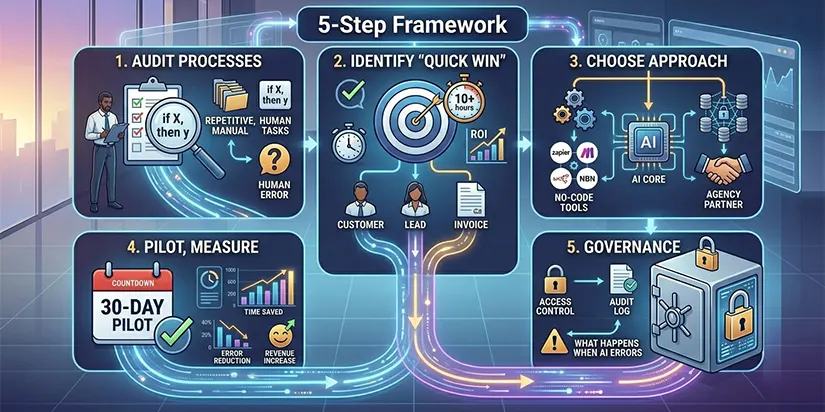
Once you’ve identified your signals, follow this five-step framework to implement business automation solutions that actually deliver results.
Step 1: Audit Your Current Processes
List every recurring task in your business. Group them by department (sales, marketing, operations, finance, customer support). Highlight tasks that are:
- Repetitive (same steps every time)
- Rule-based (if X happens, do Y)
- High-volume (hundreds or thousands per month)
- Prone to human error
These are your prime candidates for automate repetitive business tasks.
Step 2: Identify Your “Quick Win”
Pick one process that meets three criteria:
- Takes at least 10 hours of manual work per week
- Has a clear, measurable outcome (time saved, errors reduced, leads converted)
- Can be automated with off-the-shelf tools or custom development
For most businesses, customer support ticketing, lead capture and routing, or invoice processing are excellent starting points.
Step 3: Choose the Right Approach
| Your Situation | Recommended Approach |
|---|---|
| You need fast, low-cost automation | Start with no-code tools (Zapier, Make, n8n) |
| You have unique, complex workflows | Build custom AI integration services |
| You need enterprise-grade security and scale | Partner with an AI-driven automation agency |
A good AI integration services partner will help you evaluate trade-offs between speed, cost, and long-term maintainability.
Step 4: Pilot, Measure, Expand
Run a 30-day pilot for your chosen automation. Track:
- Time saved (hours per week)
- Error reduction (%)
- Impact on customer satisfaction or revenue
If the pilot delivers positive ROI (most workflow automation pilots pay back in under six months), expand to similar processes across your business.
Step 5: Build a Governance Framework
As you scale, establish guardrails:
- Who has access to AI-driven decision-making?
- How do you audit automated actions?
- What happens when an AI agent makes a mistake?
Jitterbit’s 2026 survey found that 47% of businesses rank AI accountability and auditability as a top consideration when selecting new tools. Don’t wait until something goes wrong, build governance from day one.
The Business Case: Why Acting Now Pays Off
| Metric | What It Means for You |
|---|---|
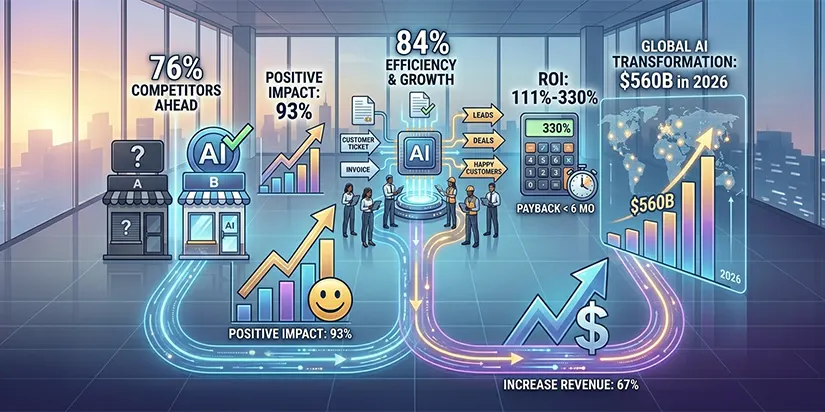
| 76% of small businesses already use AI | Your competitors are likely already ahead |
| 93% of AI-using SMBs report positive impact | The ROI is real and measurable |
| 84% cite increased efficiency as primary benefit | You’ll free up your team for higher-value work |
| Workflow automation ROI: 111%–330% | Payback typically under 6 months |
| Global AI in digital transformation market: $560B in 2026 | This is where business investment is flowing |
| 67% of SMBs expect AI to increase revenue | Automation isn’t just cost-cutting, it’s growth |
The AI readiness for small business isn’t about having perfect data or a massive IT budget. It’s about recognizing the signs and taking the first step.
How to Calculate Your Own Automation ROI (simple formula)
You don’t need a finance degree to figure out if automation pays off. Use this simple formula:
ROI (%) = (Time saved × hourly labor cost + Error reduction value) – (Automation cost + setup time) ÷ (Automation cost + setup time) × 100
Let’s walk through a real example.
Scenario: You automate lead routing from your contact form to your CRM. Manual work takes 10 hours per week at $40/hour (including benefits). That’s $400 per week or $20,800 per year.
Step 1 – Calculate the savings
Time saved: 10 hours/week × 52 weeks = 520 hours × $40 = $20,800 per year.
Step 2 – Estimate error reduction
Manual data entry introduces 5% errors. Each error costs $50 to fix (lost time, customer follow-up). Over 1,000 leads/year, that’s 50 errors × $50 = $2,500 saved.
Total annual benefit = $20,800 + $2,500 = $23,300
Step 3 – Calculate costs
Automation tool: $200/month × 12 = $2,400
Setup: 4 hours of your team’s time at $40 = $160
Total cost = $2,560
Step 4 – Apply the formula
ROI = ($23,300 – $2,560) ÷ $2,560 × 100 = 810%
That means for every dollar you invest, you get back $8.10 in the first year.
What this tells you:
- Payback period is under 2 months ($2,560 ÷ $23,300 × 12 = 1.3 months)
- Even if your numbers are half as optimistic, you still get >400% ROI
Use your own numbers: track time spent on a repetitive task for one week, multiply by your team’s hourly cost, and plug it into the formula. You’ll quickly see why AI-driven automation for businesses isn’t an expense, it’s a high-return investment.
How Ingenious Netsoft Helps Businesses Automate Smarter
You’ve seen the signs. You know your business is ready. But where do you go from here?
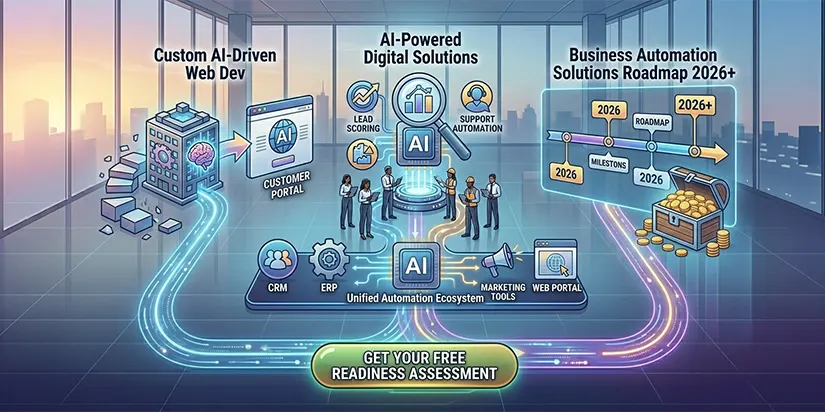
At Ingenious Netsoft, we help businesses like yours move from manual, fragmented operations to intelligent, AI-driven workflows. Our AI integration services connect your existing systems, CRMs, ERPs, ecommerce platforms, and marketing tools into unified automation ecosystems.
Whether you need:
- Custom AI-driven web development services to embed intelligence into your customer portal
- AI-powered digital solutions for lead scoring, inventory forecasting, or customer support automation
- A complete business automation solutions roadmap for 2026 and beyond
Our team builds practical, scalable automation that delivers measurable ROI.
Your next step: Book a free automation readiness assessment. We’ll review your current processes, identify your highest-value automation opportunities, and show you exactly how to start.
Get Your Free Automation Readiness Assessment